#
AutoAttend Architecture
This repository provides production-ready Kubernetes configurations for deploying AutoAttend, a scalable facial recognition attendance tracking system. AutoAttend uses Milvus vector database for efficient face matching and supports real-time attendance monitoring via web interface.
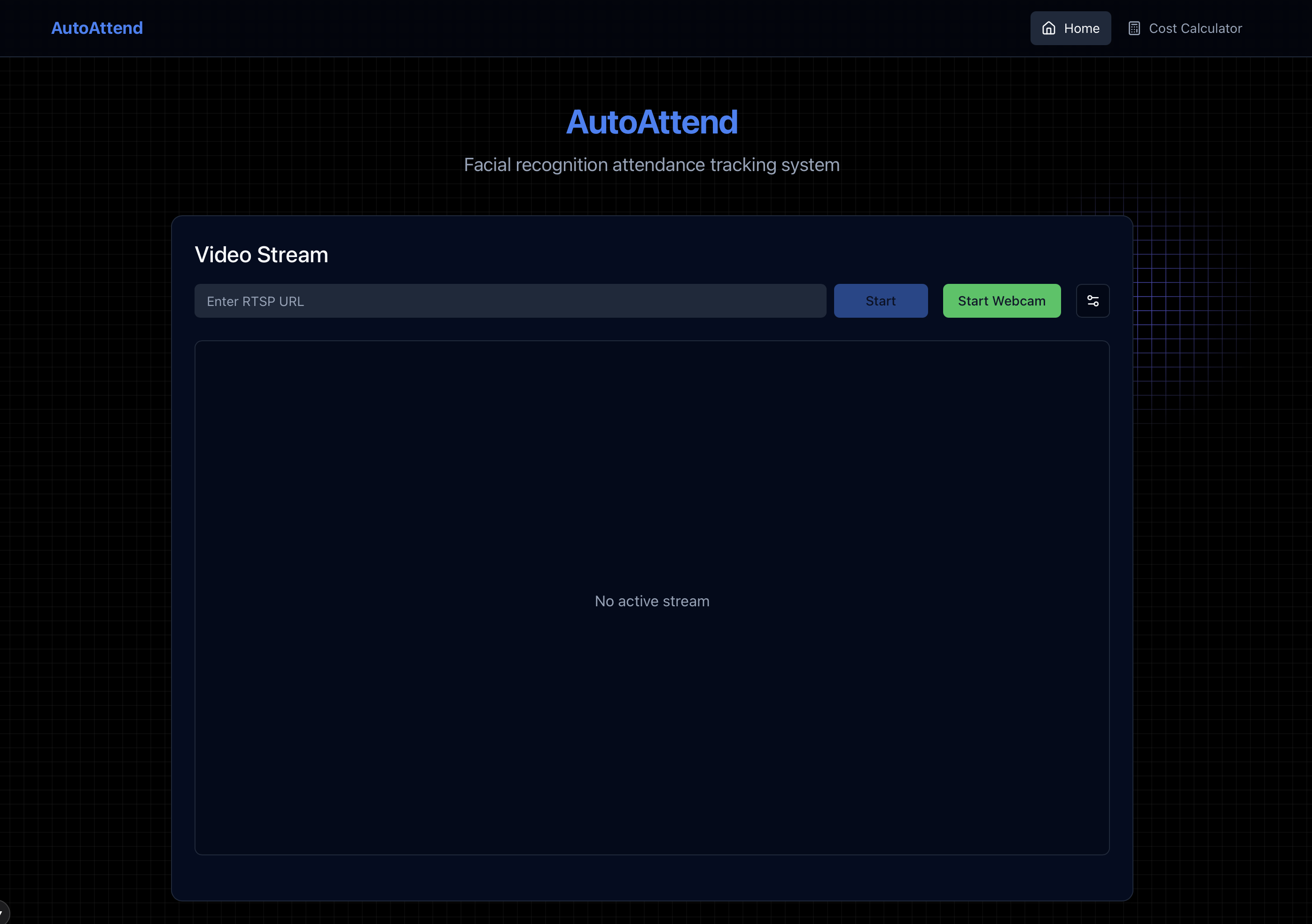
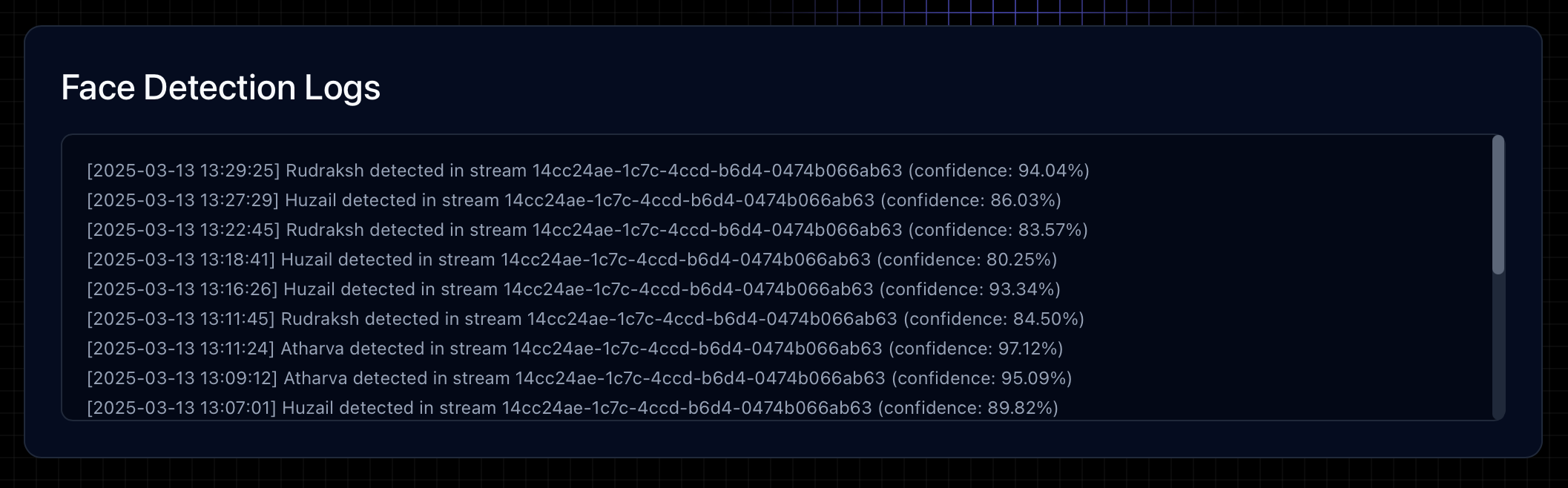
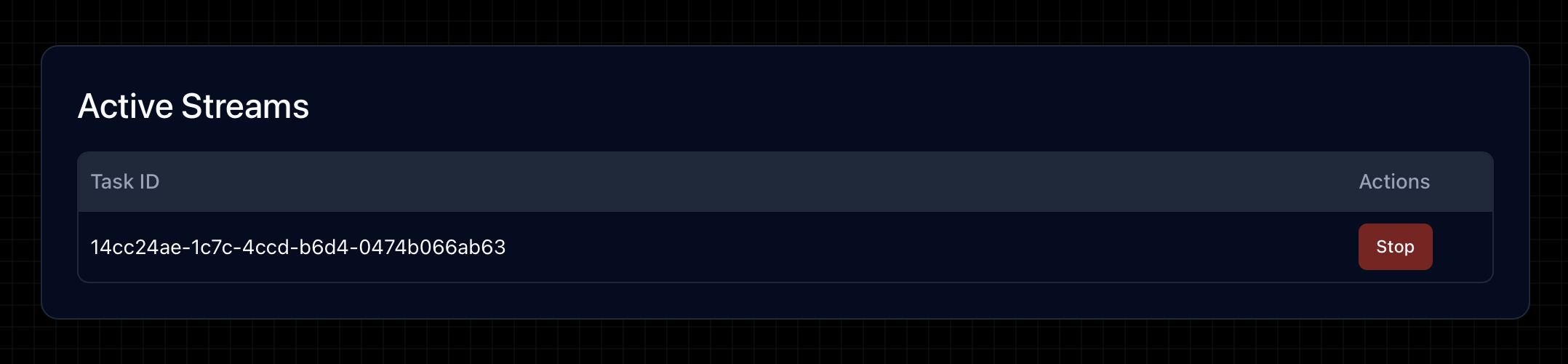
The system shows logs of detected features, allows downloading them and more for each stream. The system also allows turning on/off streams.
Note
For installation, we send you the images for frontend and backend and template environment files.
We also send you a template kubernetes configuration that you can tweak according to your needs.
If you want to start small, we also send you a production grade docker compose file.
#
System Architecture
AutoAttend is architected as a cloud-native application following microservices patterns and best practices for Kubernetes deployments.
flowchart TD
    subgraph External ["External Traffic"]
        User["User/Browser"]
        Internet["Internet"]
    end

    subgraph Kubernetes ["Kubernetes Cluster"]
        subgraph IngressLayer ["Ingress Layer"]
            Ingress["Ingress Controller"]
            style Ingress fill:#326ce5,color:white
            TLS["TLS Termination"]
            style TLS fill:#1C662F,color:white
        end

        subgraph FrontendNS ["Frontend Namespace"]
            style FrontendNS fill:#e3f2fd,stroke:#1565c0,stroke-width:2px
            FrontendSvc["Frontend Service"]
            FrontendDeploy["Next.js Pods"]
            FrontendSvc --- FrontendDeploy
        end

        subgraph BackendNS ["Backend Namespace"]
            style BackendNS fill:#e8f5e9,stroke:#2e7d32,stroke-width:2px
            BackendSvc["API Service"]
            WebSocketSvc["WebSocket Service"]
            BackendDeploy["FastAPI + Uvicorn Pods"]
            HPA["Horizontal Pod Autoscaler"]
            style HPA fill:#FFB000,color:black

            CeleryWorkers["Celery Workers"]

            BackendSvc --- BackendDeploy
            WebSocketSvc --- BackendDeploy
            HPA -.- BackendDeploy
            HPA -.- CeleryWorkers
        end

        subgraph DataNS ["Data Namespace"]
            style DataNS fill:#fff3e0,stroke:#e65100,stroke-width:2px
            RedisSvc["Redis Cache StatefulSet"]
            RabbitMQSvc["RabbitMQ StatefulSet"]
            MilvusSvc["Milvus Vector DB StatefulSet"]

            RedisPVC["Redis PVC"]
            RabbitMQPVC["RabbitMQ PVC"]
            MilvusPVC["Milvus PVC"]

            style RedisPVC fill:#FFE0B2,stroke:#E65100,stroke-width:1px,stroke-dasharray: 5 5
            style RabbitMQPVC fill:#FFE0B2,stroke:#E65100,stroke-width:1px,stroke-dasharray: 5 5
            style MilvusPVC fill:#FFE0B2,stroke:#E65100,stroke-width:1px,stroke-dasharray: 5 5

            RedisSvc --- RedisPVC
            RabbitMQSvc --- RabbitMQPVC
            MilvusSvc --- MilvusPVC
        end

        subgraph MLNS ["ML Inference Namespace"]
            style MLNS fill:#f3e5f5,stroke:#7b1fa2,stroke-width:2px
            MLSvc["ML Inference Service"]
            MLPods["Face Recognition Pods"]
            MLSvc --- MLPods
        end
    end

    %% External connections
    Internet --> Ingress
    User --> Internet

    %% Ingress Layer connections
    Ingress -- "HTTPS" --> TLS
    TLS --> FrontendSvc
    TLS --> BackendSvc
    TLS --> WebSocketSvc

    %% Service connections
    FrontendDeploy -- "REST API requests" --> BackendSvc
    FrontendDeploy -- "WebSocket connections" --> WebSocketSvc

    %% Backend connections
    BackendDeploy -- "Cache operations" --> RedisSvc
    BackendDeploy -- "Task queue" --> RabbitMQSvc
    BackendDeploy -- "Face DB queries" --> MilvusSvc

    %% Celery and ML connections
    RabbitMQSvc -- "Task consume" --> CeleryWorkers
    CeleryWorkers -- "Inference requests" --> MLSvc
    MLPods -- "Vector matching" --> MilvusSvc

    %% Styling
    class User,Internet external
    class RedisSvc,RabbitMQSvc,MilvusSvc infra
    class BackendDeploy,MLPods,CeleryWorkers emphasis
    classDef emphasis fill:#C8E6C9,stroke:#00796B,stroke-width:1px
    classDef external fill:#f9f,stroke:#333,stroke-width:2px
    classDef infra fill:#bbf,stroke:#33c,stroke-width:2px

    %% Legend
    subgraph Legend ["Legend"]
        L1["Application Component"]
        L2["Infrastructure Component"]
        L3["External Component"]
        L4["Namespace Boundary"]
        L5["Persistent Volume"]

        style L1 fill:#C8E6C9,stroke:#00796B,stroke-width:1px
        style L2 fill:#bbf,stroke:#33c,stroke-width:2px
        style L3 fill:#f9f,stroke:#333,stroke-width:2px
        style L4 fill:#EEEEEE,stroke:#555555,stroke-width:2px,stroke-dasharray: 5 5
        style L5 fill:#FFE0B2,stroke:#E65100,stroke-width:1px,stroke-dasharray: 5 5
    end
#
Key Components
#
Namespaces
The system uses Kubernetes namespaces to isolate components:
#
Component Breakdown
#
Prerequisites
Before deploying, ensure you have:
- Kubernetes cluster (1.18+)
- kubectl CLI tool configured to connect to your cluster
- Docker and container registry access
- Domain name (for production deployment)
- TLS certificates (for production deployment)
#
Configuration
#
Environment Variables
The system is configured using environment variables. Copy the .env.example file to .env for production deployment:
# OR
cp .env.example .env  # For production deployment
Key configuration parameters:
#
Deployment
#
Production Deployment
For production environments:
./deploy-prod.shThis script:
- Creates production-grade configurations
- Sets up TLS/SSL with cert-manager
- Configures ingress rules
- Applies resource limits and auto-scaling
- Sets up network policies for security
#
Security Features
The deployment implements several security best practices:
- Namespace isolation with network policies
- Non-root container execution
- Resource quotas and limits
- TLS/SSL encryption for all traffic
- Secret management for sensitive information
- RBAC for service accounts
- Network policies restricting pod-to-pod communication
#
Network Policies
Network policies enforce strict rules for pod-to-pod communication, implementing the principle of least privilege to minimize the attack surface.
flowchart LR
    subgraph "Ingress-Nginx Namespace"
        style ingress-nginx fill:#e8eaf6,stroke:#3949ab,stroke-width:2px
        Ingress[("Ingress<br>Controller")]
        style Ingress fill:#5c6bc0,color:white
    end

    subgraph "Frontend Namespace"
        style frontend fill:#e3f2fd,stroke:#1565c0,stroke-width:2px
        FrontendPods[("Frontend<br>Pods")]
        FrontendNetPol["Network Policy<br>frontend-policy"]
        style FrontendNetPol fill:#bbdefb,stroke:#1565c0,stroke-width:1px,stroke-dasharray: 5 5

        FrontendNetPol -.- FrontendPods
    end

    subgraph "Backend Namespace"
        style backend fill:#e8f5e9,stroke:#2e7d32,stroke-width:2px
        BackendPods[("Backend<br>Pods")]
        CeleryWorkers[("Celery<br>Workers")]
        BackendNetPol["Network Policy<br>backend-policy"]
        style BackendNetPol fill:#c8e6c9,stroke:#2e7d32,stroke-width:1px,stroke-dasharray: 5 5

        BackendNetPol -.- BackendPods
        BackendNetPol -.- CeleryWorkers
    end

    subgraph "Data Namespace"
        style data fill:#fff3e0,stroke:#e65100,stroke-width:2px
        Redis[("Redis<br>Cache")]
        RabbitMQ[("RabbitMQ")]
        Milvus[("Milvus<br>Vector DB")]
        RedisNetPol["Network Policy<br>redis-policy"]
        RabbitNetPol["Network Policy<br>rabbitmq-policy"]

        style RedisNetPol fill:#ffe0b2,stroke:#e65100,stroke-width:1px,stroke-dasharray: 5 5
        style RabbitNetPol fill:#ffe0b2,stroke:#e65100,stroke-width:1px,stroke-dasharray: 5 5

        RedisNetPol -.- Redis
        RabbitNetPol -.- RabbitMQ
    end

    subgraph "ML Inference Namespace"
        style ml-inference fill:#f3e5f5,stroke:#7b1fa2,stroke-width:2px
        MLPods[("ML Inference<br>Pods")]
        MLNetPol["Network Policy<br>ml-inference-policy"]
        style MLNetPol fill:#e1bee7,stroke:#7b1fa2,stroke-width:1px,stroke-dasharray: 5 5

        MLNetPol -.- MLPods
    end

    %% Allowed network flows with detailed protocol info
    Ingress -->|"HTTPS (443)"| FrontendPods
    Ingress -->|"HTTPS (443)"| BackendPods

    FrontendPods -->|"HTTP (80)<br>API Calls"| BackendPods
    BackendPods -->|"TCP (6379)<br>Cache Operations"| Redis
    BackendPods -->|"AMQP (5672)<br>Task Queue"| RabbitMQ
    BackendPods -->|"TCP (19530)<br>Vector Search"| Milvus
    CeleryWorkers -->|"TCP (19530)<br>Vector Search"| Milvus
    CeleryWorkers -->|"gRPC (50055)<br>ML Requests"| MLPods

    %% Denied connections (with red dashed lines)
    FrontendPods -.-x Redis
    FrontendPods -.-x RabbitMQ
    FrontendPods -.-x Milvus
    FrontendPods -.-x MLPods
    MLPods -.-x Redis

    %% Style for denied connections
    linkStyle 8,9,10,11,12 stroke:red,stroke-width:1.5,stroke-dasharray:3 3;

    %% Legend
    subgraph Legend["Network Policy Legend"]
        AllowedFlow["Allowed Traffic<br>Flow"]
        DeniedFlow["Explicitly Denied<br>Traffic Flow"]
        NetworkPolicy["Network Policy"]

        style AllowedFlow fill:#ffffff,stroke:#000000
        style DeniedFlow fill:#ffffff,stroke:red,stroke-dasharray:3 3
        style NetworkPolicy fill:#ffffff,stroke:#000000,stroke-dasharray: 5 5
    end
#
Detailed Network Policy Configuration
Each namespace has one or more network policies that restrict pod-to-pod communication:
classDiagram
    class FrontendPolicy {
        +Namespace: frontend
        +PodSelector: app=frontend
        +Ingress: from ingress-nginx namespace
        +Ingress: from kubelet health checks
        +Egress: to backend namespace on port 80
    }

    class BackendPolicy {
        +Namespace: backend
        +PodSelector: app=backend
        +Ingress: from frontend namespace
        +Ingress: from ingress-nginx namespace
        +Egress: to data namespace (Redis, RabbitMQ, Milvus)
        +Egress: to ML inference namespace
    }

    class RedisPolicy {
        +Namespace: data
        +PodSelector: app=redis
        +Ingress: from backend namespace on port 6379
    }

    class RabbitMQPolicy {
        +Namespace: data
        +PodSelector: app=rabbitmq
        +Ingress: from backend namespace on port 5672
    }

    class MLPolicy {
        +Namespace: ml-inference
        +PodSelector: app=ml-inference
        +Ingress: from backend namespace
        +Egress: to data namespace (Milvus)
    }

    FrontendPolicy --> BackendPolicy: Allows traffic to
    BackendPolicy --> RedisPolicy: Allows traffic to
    BackendPolicy --> RabbitMQPolicy: Allows traffic to
    BackendPolicy --> MLPolicy: Allows traffic to
    MLPolicy --> RedisPolicy: Denied
#
Deployment Process
The deployment process follows a structured approach to ensure consistency and reliability in both development and production environments.
flowchart TB
    Start(["Start Deployment"]) --> EnvConfig["Configure Environment Variables<br>.env.local or .env"]

    EnvConfig --> DeployDecision{"Deployment<br>Environment?"}
    DeployDecision -->|"Development"| LocalDeploy["./deploy-local.sh"]
    DeployDecision -->|"Production"| ProdDeploy["./deploy-prod.sh"]

    subgraph Local["Local Deployment Process"]
        LocalDeploy --> CreateLocalNS["Create Namespaces"]
        CreateLocalNS --> CreateLocalStorage["Setup Local Storage Class"]
        CreateLocalStorage --> CreateLocalSecrets["Create Development Secrets"]
        CreateLocalSecrets --> DeployLocalData["Deploy Data Services<br>(Redis, RabbitMQ)"]
        DeployLocalData --> DeployLocalBackend["Deploy Backend Services"]
        DeployLocalBackend --> DeployLocalFrontend["Deploy Frontend"]
        DeployLocalFrontend --> SetupPortForward["Setup Port Forwarding<br>for Local Access"]
    end

    subgraph Production["Production Deployment Process"]
        ProdDeploy --> CreateProdNS["Create Namespaces"]
        CreateProdNS --> CreateProdStorage["Setup Cloud-Provider<br>Storage Class"]
        CreateProdStorage --> CreateProdSecrets["Create Production Secrets<br>with Strict Permissions"]
        CreateProdSecrets --> DeployNetPolicies["Deploy Network Policies"]
        DeployNetPolicies --> DeployProdData["Deploy Data Services<br>with Production Settings"]
        DeployProdData --> DeployProdBackend["Deploy Backend Services<br>with Autoscaling"]
        DeployProdBackend --> DeployProdFrontend["Deploy Frontend<br>with Multiple Replicas"]
        DeployProdFrontend --> SetupIngress["Deploy & Configure<br>Ingress with TLS"]
    end

    SetupPortForward --> LocalComplete(["Local Deployment<br>Complete"])
    SetupIngress --> ConfigureDNS["Configure DNS"]
    ConfigureDNS --> TestAccess["Test External Access"]
    TestAccess --> ProdComplete(["Production Deployment<br>Complete"])

    classDef process fill:#bbdefb,stroke:#1565c0,color:#000000;
    classDef decision fill:#ffecb3,stroke:#ffa000,color:#000000;
    classDef endpoint fill:#c8e6c9,stroke:#2e7d32,color:#000000;

    class Start,LocalComplete,ProdComplete endpoint;
    class EnvConfig,LocalDeploy,ProdDeploy,CreateLocalNS,CreateLocalStorage,CreateLocalSecrets,DeployLocalData,DeployLocalBackend,DeployLocalFrontend,SetupPortForward,CreateProdNS,CreateProdStorage,CreateProdSecrets,DeployNetPolicies,DeployProdData,DeployProdBackend,DeployProdFrontend,SetupIngress,ConfigureDNS,TestAccess process;
    class DeployDecision decision;
#
Maintenance Operations
#
Scaling and Reliability
The system implements both manual scaling and Horizontal Pod Autoscaling (HPA) for dynamic resource adjustment based on workload.
flowchart TB
    subgraph "Scaling Operations"
        ManualScale["Manual Scaling<br>kubectl scale deployment"] --> ScaleFrontend["Scale Frontend<br>kubectl scale deployment frontend<br>-n frontend --replicas=5"]
        ManualScale --> ScaleBackend["Scale Backend<br>kubectl scale deployment backend<br>-n backend --replicas=8"]
        ManualScale --> ScaleCelery["Scale Celery Workers<br>kubectl scale deployment celery-worker<br>-n backend --replicas=12"]

        HPA["Horizontal Pod<br>Autoscaler"] --> BackendHPA["Backend HPA<br>4-10 replicas<br>70% CPU target<br>80% Memory target"]
        HPA --> CeleryHPA["Celery HPA<br>4-20 replicas<br>70% CPU target"]
    end

    subgraph "High Availability"
        PodAntiAffinity["Pod Anti-Affinity<br>Rules"]
        PodDisruptionBudget["Pod Disruption<br>Budget (PDB)"]

        PodAntiAffinity --> DistributeFrontend["Distribute Frontend Pods<br>Across Nodes"]
        PodAntiAffinity --> DistributeBackend["Distribute Backend Pods<br>Across Nodes"]

        PodDisruptionBudget --> FrontendPDB["Frontend PDB<br>minAvailable: 2"]
        PodDisruptionBudget --> BackendPDB["Backend PDB<br>minAvailable: 3"]
        PodDisruptionBudget --> DataPDB["Data Services PDB<br>minAvailable: 1"]
    end

    subgraph "Resource Management"
        ResourceRequests["Resource Requests<br>& Limits"]
        ResourceQuotas["Namespace<br>Resource Quotas"]

        ResourceRequests --> BackendResources["Backend<br>req: 500m CPU, 512Mi Memory<br>limit: 1000m CPU, 1Gi Memory"]
        ResourceRequests --> FrontendResources["Frontend<br>req: 200m CPU, 256Mi Memory<br>limit: 500m CPU, 512Mi Memory"]
        ResourceRequests --> CeleryResources["Celery Worker<br>req: 500m CPU, 1Gi Memory<br>limit: 2000m CPU, 2Gi Memory"]
        ResourceRequests --> MLResources["ML Inference<br>req: 1000m CPU, 2Gi Memory<br>limit: 4000m CPU, 4Gi Memory"]

        ResourceQuotas --> FrontendQuota["Frontend Namespace<br>max: 4000m CPU, 8Gi Memory"]
        ResourceQuotas --> BackendQuota["Backend Namespace<br>max: 16000m CPU, 32Gi Memory"]
        ResourceQuotas --> DataQuota["Data Namespace<br>max: 8000m CPU, 16Gi Memory"]
    end

    style ManualScale fill:#bbdefb,stroke:#1565c0,color:#000000;
    style HPA fill:#bbdefb,stroke:#1565c0,color:#000000;
    style PodAntiAffinity fill:#c8e6c9,stroke:#2e7d32,color:#000000;
    style PodDisruptionBudget fill:#c8e6c9,stroke:#2e7d32,color:#000000;
    style ResourceRequests fill:#ffe0b2,stroke:#e65100,color:#000000;
    style ResourceQuotas fill:#ffe0b2,stroke:#e65100,color:#000000;
#
CI/CD and Update Process
The system implements a robust CI/CD pipeline and structured update process to ensure reliable deployments.
flowchart TD
    subgraph "CI/CD Pipeline"
        direction TB
        CodeChange["Code Change<br>Committed"] --> CITrigger["CI Pipeline<br>Triggered"]
        CITrigger --> BuildTest["Build & Run<br>Automated Tests"]
        BuildTest -->|"Tests Pass"| BuildImages["Build Container<br>Images"]
        BuildTest -->|"Tests Fail"| FailNotify["Notify<br>Developers"]

        BuildImages --> TagImages["Tag Images<br>with Version"]
        TagImages --> PushRegistry["Push to<br>Container Registry"]

        PushRegistry --> DeployDev["Deploy to<br>Development Environment"]
        DeployDev --> IntegrationTests["Run Integration<br>Tests"]
        IntegrationTests -->|"Tests Pass"| ApproveProduction["Approve for<br>Production"]
        IntegrationTests -->|"Tests Fail"| RollbackDev["Rollback<br>Development"]
    end

    subgraph "Update Process"
        direction TB
        ApproveProduction -.-> UpdateImages["Update Image Tags<br>in Deployment Files"]

        UpdateImages --> UpdateBackend["Update Backend<br>./rebuild-backend-image.sh<br>./redeploy-backend.sh"]
        UpdateImages --> UpdateFrontend["Update Frontend<br>./rebuild-frontend-image.sh<br>./redeploy-frontend.sh"]

        UpdateBackend --> VerifyBackend["Verify Backend<br>Deployment"]
        UpdateFrontend --> VerifyFrontend["Verify Frontend<br>Deployment"]

        VerifyBackend --> MonitorHealth["Monitor System<br>Health"]
        VerifyFrontend --> MonitorHealth

        MonitorHealth -->|"Issues Detected"| Rollback["Rollback Deployment<br>kubectl rollout undo"]
        MonitorHealth -->|"Stable"| CompleteUpdate["Update Complete"]

        Rollback --> PostMortem["Conduct Post-Mortem<br>Analysis"]
    end

    style CodeChange fill:#bbdefb,stroke:#1565c0,color:black;
    style CITrigger fill:#bbdefb,stroke:#1565c0,color:black;
    style BuildTest fill:#bbdefb,stroke:#1565c0,color:black;
    style BuildImages fill:#bbdefb,stroke:#1565c0,color:black;
    style TagImages fill:#bbdefb,stroke:#1565c0,color:black;
    style PushRegistry fill:#bbdefb,stroke:#1565c0,color:black;
    style DeployDev fill:#bbdefb,stroke:#1565c0,color:black;
    style IntegrationTests fill:#bbdefb,stroke:#1565c0,color:black;
    style ApproveProduction fill:#bbdefb,stroke:#1565c0,color:black;

    style UpdateImages fill:#c8e6c9,stroke:#2e7d32,color:black;
    style UpdateBackend fill:#c8e6c9,stroke:#2e7d32,color:black;
    style UpdateFrontend fill:#c8e6c9,stroke:#2e7d32,color:black;
    style VerifyBackend fill:#c8e6c9,stroke:#2e7d32,color:black;
    style VerifyFrontend fill:#c8e6c9,stroke:#2e7d32,color:black;
    style MonitorHealth fill:#c8e6c9,stroke:#2e7d32,color:black;
    style CompleteUpdate fill:#c8e6c9,stroke:#2e7d32,color:black;

    style FailNotify fill:#ffcdd2,stroke:#c62828,color:black;
    style RollbackDev fill:#ffcdd2,stroke:#c62828,color:black;
    style Rollback fill:#ffcdd2,stroke:#c62828,color:black;
    style PostMortem fill:#ffcdd2,stroke:#c62828,color:black;
#
Monitoring and Observability
The system implements comprehensive monitoring and observability for real-time system health tracking.
flowchart TB
    subgraph "Monitoring Components"
        Prometheus["Prometheus<br>Metrics Collection"]
        Grafana["Grafana<br>Dashboards"]
        AlertManager["Alert Manager<br>Notifications"]
        Loki["Loki<br>Log Aggregation"]

        Prometheus --> Grafana
        Prometheus --> AlertManager
        Loki --> Grafana
    end

    subgraph "System Metrics"
        NodeMetrics["Node Metrics<br>CPU, Memory, Disk, Network"]
        PodMetrics["Pod Metrics<br>CPU, Memory, Restarts"]
        AppMetrics["Application Metrics<br>Request Rate, Latency, Errors"]
        DBMetrics["Database Metrics<br>Connections, Query Performance"]

        NodeExporter["Node Exporter"] --> NodeMetrics
        cAdvisor["cAdvisor"] --> PodMetrics
        ServiceMonitor["Service Monitor"] --> AppMetrics
        DBExporter["Database Exporter"] --> DBMetrics

        NodeMetrics --> Prometheus
        PodMetrics --> Prometheus
        AppMetrics --> Prometheus
        DBMetrics --> Prometheus
    end

    subgraph "Log Collection"
        AppLogs["Application Logs"]
        K8sLogs["Kubernetes Events"]
        IngressLogs["Ingress Controller Logs"]

        Fluentbit["Fluent Bit"] --> AppLogs
        Fluentbit --> K8sLogs
        Fluentbit --> IngressLogs

        AppLogs --> Loki
        K8sLogs --> Loki
        IngressLogs --> Loki
    end

    subgraph "Health Checks"
        LivenessProbes["Liveness Probes<br>Is the container running?"]
        ReadinessProbes["Readiness Probes<br>Is the service ready to accept traffic?"]
        StartupProbes["Startup Probes<br>Has the application started?"]

        LivenessProbes --> KubeAPI["Kubernetes API"]
        ReadinessProbes --> KubeAPI
        StartupProbes --> KubeAPI
    end

    subgraph "Alerting"
        HighCPU["High CPU Usage"]
        HighMemory["High Memory Usage"]
        PodCrash["Pod Crash"]
        HighLatency["High API Latency"]
        ErrorRate["High Error Rate"]

        HighCPU --> AlertManager
        HighMemory --> AlertManager
        PodCrash --> AlertManager
        HighLatency --> AlertManager
        ErrorRate --> AlertManager

        AlertManager --> Email["Email"]
        AlertManager --> Slack["Slack"]
        AlertManager --> PagerDuty["PagerDuty"]
    end

    style Prometheus fill:#bbdefb,stroke:#1565c0,color:black;
    style Grafana fill:#bbdefb,stroke:#1565c0,color:black;
    style AlertManager fill:#bbdefb,stroke:#1565c0,color:black;
    style Loki fill:#bbdefb,stroke:#1565c0,color:black;

    style NodeMetrics,PodMetrics,AppMetrics,DBMetrics fill:#c8e6c9,stroke:#2e7d32,color:black
    style NodeExporter,cAdvisor,ServiceMonitor,DBExporter fill:#e3f2fd,stroke:#1565c0,color:black
    style AppLogs,K8sLogs,IngressLogs fill:#e8f5e9,stroke:#2e7d32,color:black
    style LivenessProbes,ReadinessProbes,StartupProbes fill:#fff3e0,stroke:#e65100,color:black
    style HighCPU,HighMemory,PodCrash,HighLatency,ErrorRate fill:#ffcdd2,stroke:#c62828,color:black
    style Email,Slack,PagerDuty fill:#f3e5f5,stroke:#7b1fa2,color:black
#
Health Checks and Monitoring Commands
# Check pod status
kubectl get pods --all-namespaces

# View logs
kubectl logs -f -n backend -l app=backend
kubectl logs -f -n frontend -l app=frontend

# Monitor resource usage
kubectl top pods --all-namespaces
#
Face Recognition System
The system uses advanced facial recognition algorithms to track attendance:
- Face Detection: Detects and isolates faces in camera feeds
- Face Embedding: Converts facial features into vector representations
- Vector Matching: Compares embeddings against stored profiles in Milvus
- Attendance Recording: Records matches with timestamps in the database
#
Milvus Configuration
The Milvus vector database is configured for efficient face embedding storage and retrieval:
# Example Milvus collection configuration
collection_name: face_embeddings
dimension: 512
index_type: IVF_FLAT
metric_type: L2
#
Troubleshooting
#
Common Issues
#
Debugging Commands
# Check events
kubectl get events -n <namespace>

# Describe resource
kubectl describe pod <pod-name> -n <namespace>

# Port forward for direct access
kubectl port-forward -n <namespace> svc/<service> <local-port>:<service-port>

# Check logs with timestamps
kubectl logs -f -n <namespace> <pod-name> --timestamps
#
Best Practices
- Resource Management: Set appropriate requests and limits for all containers
- Liveness/Readiness Probes: Implement for all services for better auto-healing
- StatefulSets: Use for stateful services like databases
- ConfigMaps/Secrets: Separate configuration from code
- Rolling Updates: Use for zero-downtime deployments
- Namespace Isolation: Keep components separated for better security